Verifiedon 2026.7.1
Action boundary
Before you act
- Expected result
- A recovery checklist names state boundaries, an owner, recovery objectives, a verified backup, and a tested restore result.
- Failure mode
- A copied backup cannot recreate a working known-good state or contains unprotected secrets.
- Rollback
- Make no production changes; retain only the redacted planning record and correct the checklist.
A backup is a hypothesis until restore proves it
“Backup completed” answers only whether bytes were written. Recovery asks a harder question: can the approved operator restore the relevant state into a safe target and make the critical path work within the agreed time? A file can exist while being incomplete, unreadable, from the wrong installation, copied during an unsafe database write, or unusable because the version that wrote it is no longer available.
OpenClaw’s current backup surface gives a useful foundation. The official Backup CLI reference documents openclaw backup create, archive verification, and SQLite snapshots. It explicitly warns not to copy live .sqlite, -wal, .shm, or .journal files as a portability artifact. It also says that snapshots are sensitive because they can contain auth profiles, session state, and plugin state. This lesson turns those product guarantees into an operator proof: identify the boundary, create the artifact, verify it, restore to a fresh target, and run acceptance checks.
The course is scoped to OpenClaw stable 2026.7.1, with upstream revision 2d2ddc43d0dcf71f31283d780f9fe9ff4cc04fe4 recorded in the frontmatter. The current docs were checked 2026-08-01 UTC; if the installed CLI or a later release changes paths or flags, stop and resolve the difference before running a write. The committed recovery game-day receipt is a bounded command receipt: backup create --verify and backup verify passed against synthetic state, while the exact pinned binary rejected backup restore. Do not turn that documented fallback into an undocumented production command.
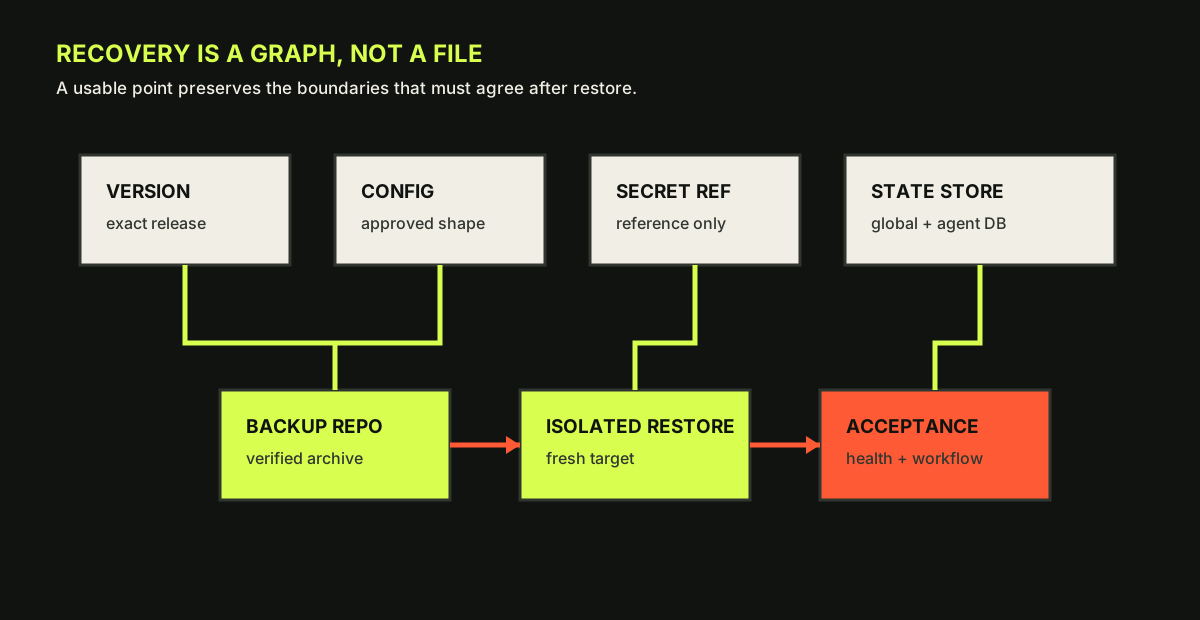
- Version identifies the build that can read the state.
- Configuration and secret references are preserved without placing secret values in the course artifact.
- Global and per-agent SQLite stores are application state, not incidental files.
- The isolated restore target and acceptance check turn availability into evidence.
Draw the recovery boundary
Start with a table that names what must be preserved, who owns it, and how it will be accepted:
| Boundary | What to record | Recovery proof |
|---|---|---|
| Code and version | exact version, install method, package or source identity | the target reports the expected version and can start |
| Configuration | active config path and an approved redacted shape | config validates and expected settings load |
| Secret references | provider/channel names and reference paths, never values | a disposable credential or approved secret check succeeds |
| Managed service | service owner, unit/container/image identity, restart behavior | service reaches documented readiness without a crash loop |
| Global state | shared registries, approvals, plugin state, queue state | database verifies and required control-plane checks pass |
| Agent state | agent SQLite databases, sessions, transcripts, memory indexes | selected agent opens and a bounded workflow sees expected state |
| Integrations | channel account scope and external dependency assumptions | one non-destructive integration probe succeeds |
| Evidence | archive manifest, digest, timestamp, reviewer, retention | another operator can find and verify the artifact |
OpenClaw’s database schema reference is especially important before upgrades. It documents a global database at ~/.openclaw/state/openclaw.sqlite and per-agent databases under ~/.openclaw/agents/<agentId>/agent/openclaw-agent.sqlite. It also explains that migrations run forward and older builds refuse a newer schema. That means “we can reinstall the old package” is not a rollback plan after a one-way migration. A pre-change backup and a separate state directory may be safer than attempting to edit a database backward.
Set two objectives before creating the backup:
- Recovery point objective: how old may the usable state be? Example: the backup must be no more than 15 minutes old before a maintenance window.
- Recovery time objective: how long may restore plus acceptance take? Example: a sandbox restore must complete within 30 minutes, excluding credential approval.
Also name a stop condition: if verification fails, the state owner is unavailable, the archive contains unexpected payloads, or the restore target is not isolated, the maintenance window does not proceed.
Worked example: choosing the narrowest proof
Suppose the operator wants to rehearse an upgrade on a disposable copy. A broad archive is useful because it can include state, active configuration, external credentials directories, and discovered workspaces. A SQLite snapshot is useful when the objective is a portable artifact for one database. They are not substitutes.
A safe planning record might say:
Target: sandbox-openclaw-01
Current: 2026.7.1 / stable / package install
RPO: <=15 min before rehearsal
RTO: <=30 min to restore and pass acceptance
Archive: openclaw backup create --output ~/Backups --verify
SQLite proof: snapshot manifest lists the safely snapshotted state database
Restore: fresh target paths only; never overwrite live state
Acceptance: config shape loads, gateway health responds, one synthetic workflow completes
Stop: any verification error, unexpected secret, active writer, or missing owner
Owner: operator A; reviewer: operator B
The command forms above are documented by the current backup reference. Run openclaw backup create --dry-run --json first to inspect the planned scope. Then choose an output location outside the source state and workspace trees. --no-include-workspace is a deliberate scope reduction when the workspace is not part of the recovery objective; it is not a way to hide a dependency you forgot to inventory.
openclaw backup create --dry-run --json && openclaw backup create --verifyExpected output: A dry-run manifest followed by a timestamped archive whose verification completes successfully
For databases under the state directory, use the documented SQLite snapshot flow when you need a portable artifact for one OpenClaw-owned database: openclaw backup sqlite create --global --repository <private-dir> or openclaw backup sqlite create --agent <id> --repository <private-dir>. Verify with openclaw backup sqlite verify <snapshot-directory> and restore only to a fresh target with openclaw backup sqlite restore <snapshot-directory> --target <new-database-path>. Do not replace the supported flow with cp of live .sqlite, -wal, .shm, or .journal files; concurrent writes make those unsafe portability artifacts.
Permissions and privacy are part of recovery
A verified artifact can still be an incident if it is readable by the wrong person. Protect backup directories with the same or stronger permissions, encryption, retention, and destination restrictions as the live state directory. Do not upload a snapshot to a general issue tracker. Keep the course artifact redacted: names such as agent-main, a synthetic repository, and a digest marker are fine; token strings, real account IDs, and raw transcripts are not.
The archive’s manifest is evidence, not a license to disclose every path. Review the file list before sharing. The current docs say archive verification rejects traversal-style paths and validates declared payloads; still perform a human privacy review because a valid payload can be sensitive.
Lab: restore proof in an isolated target
Use a disposable instance and synthetic credentials. Complete this run sheet:
- Record exact version, install method, active state directory, config shape, state owners, and the RPO/RTO.
- Run a dry-run archive plan and remove any scope that is not required. Explain the decision.
- Create the archive with verification. Create SQLite snapshots only through the documented command.
- Inspect the manifest and verify each artifact. Record size, timestamp, digest or snapshot ID, and reviewer.
- Restore to a fresh target path. Never overwrite a live database; the official restore command requires a new target.
- Start or inspect the isolated target according to the supported runbook, then run the same acceptance checks used for the baseline.
- Record expected versus actual results, recovery time, recovery point age, and any unknown.
Expected output is a recovery checklist, archive manifest reference, restore evidence, and acceptance table. Failure cases include copying a live sidecar, restoring into the production state path, discovering that a secret reference cannot be resolved, or passing a database integrity check while the critical workflow fails. Roll back by deleting only the disposable restore target and revoking any synthetic credential; retain the redacted evidence and mark the baseline unproven if the test failed.
Local practice
Recovery baseline checkpoint
Every step remains visible without JavaScript. When enabled, this browser stores checks on this device only.
0 of 5 checked
Checkpoint: is a config copy rollback proof?
No. A saved configuration proves one input is available. It does not prove that the package can read it, that the state schema is compatible, that credentials can be resolved, that the service will start, or that the critical path works. Recovery proof is a chain. If any link is missing, write “backup exists; recovery unproven” and keep the upgrade deferred.
Learner artifact
Draw a state-and-restore map using the same seven boundaries as the diagram. Add a table with artifact owner, storage control, age, restore target, expected check, actual result, and review timestamp. The text alternative must state that arrows represent a tested recovery path, not a claim about a particular host’s file layout.
Primary receipts for this lesson are the current Backup, Database schemas, Gateway configuration, and v2026.7.1 release notes.
Source provenanceVerification and sources
Review receipt rr_recovery_baseline_backup
- Outcome
- approved
- Method
- command-test
- Reviewer
- academy-recovery-gameday-review
- Reviewed
Evidence
- academy-spec — course-9-outline-recovery-baseline-and-backup-proof; snapshot
025afa78dcd6… - openclaw-recovery-gameday — recovery-gameday-2026.7.1; snapshot
7a0d3b1994fe…
Limitations
- Game-day evidence is limited to synthetic, loopback-only state and the represented 2026.7.1 boundaries. The exact pinned CLI rejected `backup restore`; the adapted archive-manifest rollback was exercised only in disposable paths. Independent technical review approved this bounded evidence; restore remains a manual procedure because OpenClaw 2026.7.1 provides backup create/verify but no backup restore subcommand.
Lesson checkpoint
Ready to move on?
Mark this lesson complete when you can apply its outcome without relying on the examples above.