Verifiedon 2026.7.1
Action boundary
Before you act
- Expected result
- A rollback record proves the trigger, preserved evidence, restore action, post-restore acceptance checks, and remaining unknowns.
- Failure mode
- The team restores only a binary or package version and misses configuration or persisted-state compatibility.
- Rollback
- Halt further change, retain the original recovery record, and use the approved release-specific restore procedure.
A rollback is a controlled state transition
Rollback language is dangerously imprecise. “We rolled back” may mean a package manager installed an earlier binary, a service restarted, a config file was restored, a database snapshot was activated, or a user-visible workflow was tested. Those are different events. A recovery claim is complete only when the relevant code, configuration, persistent state, service lifecycle, credentials references, integrations, and critical behavior agree again—or the record clearly says which part remains unknown.
This course is scoped to stable OpenClaw 2026.7.1 and upstream revision 2d2ddc43d0dcf71f31283d780f9fe9ff4cc04fe4. Current primary receipts are the Updating guide, Backup reference, Database schemas, and Restart recovery, checked 2026-08-01 UTC. Exact target commands belong to the installed release and approved runbook. This lesson teaches the order and proof obligations; it is not permission to run a downgrade against a live database.
The committed isolated game-day receipt records the honest rollback boundary: the pinned CLI verified the archive and health checks, but rejected backup restore; recovery therefore used the verified archive manifest and disposable staging/quarantine paths. The fallback was exercised only in synthetic state and remains a technical-review limitation.
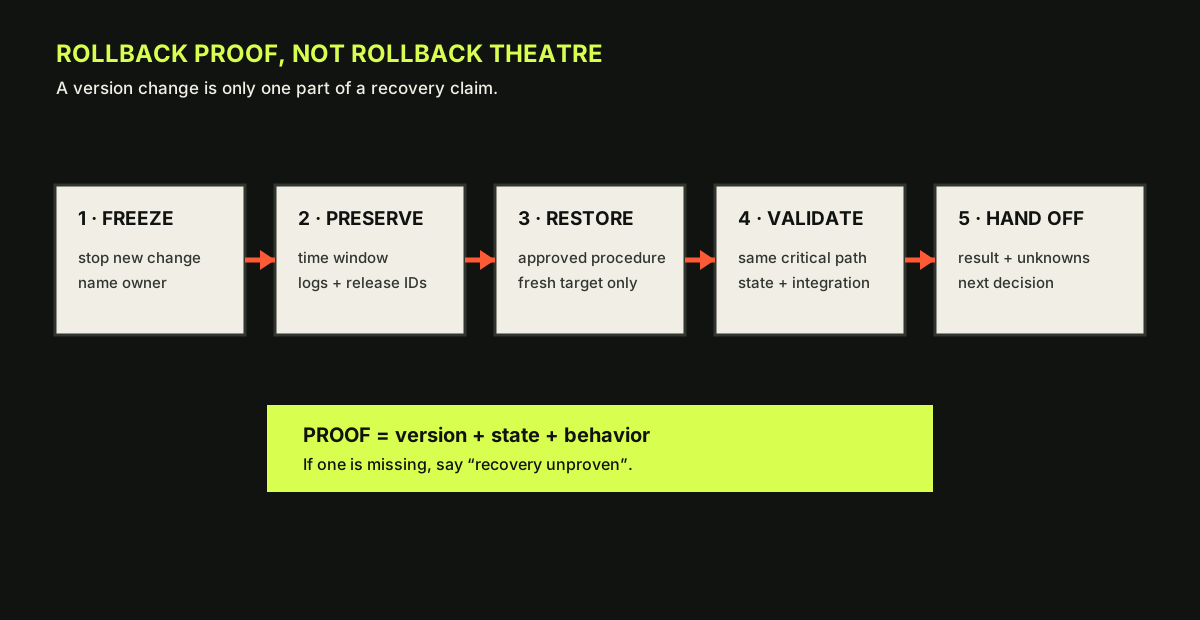
- Freeze further change and make the decision owner visible.
- Preserve the failure window, release identity, and redacted evidence before recovery.
- Restore through the approved procedure into a fresh or explicitly controlled target.
- Validate the same critical path and state boundary used for the baseline.
Decide the trigger before the change
A rollback trigger is observable, blocking, and owned. Examples include a required acceptance check failing, a critical synthetic integration not completing, a state migration failing verification, a crash loop exceeding the agreed threshold, or an RTO/RPO objective being threatened. “Someone feels uncomfortable” is a valid reason to pause and ask for review; it becomes a rollback trigger only when the decision owner records the concern and selects the action.
Write the trigger in a form that can be checked under pressure:
Rollback if any blocking acceptance check fails twice, if the state verifier reports an error,
if the gateway cannot reach readiness within 5 minutes, or if the synthetic channel sends to
an unapproved target. Operator A may freeze; reviewer B approves restore; owner C accepts recovery.
Do not set a trigger that requires a diagnosis you cannot obtain during the window. “Rollback if root cause is confirmed” is useless because you can be stuck in an unsafe state while investigating. “Rollback if the agent store fails integrity verification” is observable.
The five-step rollback record
- Freeze: stop new change, announce the current state, and prevent parallel operators from “helping.” Record the timestamp and who owns the decision.
- Preserve: capture the evidence window, target version, install root, config revision, service status, state identifiers, logs, and failed acceptance results. Redact credentials and payloads. Do not overwrite the only recovery point.
- Restore: apply the approved release-specific rollback or restore path. The Updating guide distinguishes package and source installations; the Database schemas reference warns that older builds refuse newer schemas. A package swap is not a data downgrade.
- Validate: run the same critical checks used before the change. Check version, configuration load, global and agent state, service readiness, and the bounded workflow. Compare expected versus actual.
- Hand off: state whether recovery is proven, degraded, or unknown. Name residual risk, owner, next action, and review time. Do not close the incident because the process is running.
The Backup CLI documents fresh-target SQLite restore and says it refuses in-place replacement of a live database. Follow that boundary. If a restore cannot be completed, preserve the original record and escalate; do not edit a database to silence a newer-schema error.
Worked example: binary restored, state not proven
In a synthetic rehearsal, an update completes but the channel acceptance check fails. The operator stops the service and installs the prior package. The process starts. Is recovery proven? No. The record should say:
14:22 UTC — trigger: synthetic channel acceptance failed twice.
14:24 UTC — freeze announced; no new config writes.
14:26 UTC — evidence preserved: update JSON, service logs, doctor lint, version, state IDs.
14:34 UTC — prior package active; gateway readiness responds.
14:36 UTC — agent state opens; synthetic workflow still fails at channel boundary.
Decision: recovery unproven; do not promote or close. Restore the pre-change state point in sandbox,
then investigate channel compatibility with a named owner.
This is a good result. It prevents the common false conclusion that “the old version is back, therefore users are safe.” A later restore may prove the state, or it may show that the failure was external. The handoff keeps both possibilities open.
openclaw --version && openclaw doctor --lint --json && openclaw gateway status --deep --jsonExpected output: Known-good version, no blocking lint findings, and a healthy managed gateway status
Use only flags supported by the installed build and current docs. gateway status --deep --json is a diagnostic query, not a repair. If a command is unsupported, record the gap and use the release-specific equivalent; do not invent output.
Protect against duplicate side effects
Recovery can create a second incident if the operator blindly replays an interrupted action. The current Restart recovery documentation explains that OpenClaw persists sessions, queued outbound deliveries, and recovery claims, and may resume interrupted work. It also describes cases where recovery fails closed rather than replaying an uncertain external effect. Your rollback plan should therefore distinguish read-only acceptance from side-effecting tests. Use synthetic channels, idempotent test payloads, or a provider-specific dry-run where the official runbook supports it. Never “test delivery” by sending to a real customer or shared channel during a recovery window.
If the gateway is in a crash-loop or channel autostart is suppressed, do not force every channel back up. First inspect the root cause, state, and channel status. A manual start is a separate action requiring its own owner and acceptance. Record whether the recovery is process-level, gateway-level, or channel-level.
Lab: prove the recovery point
In a disposable target, apply the pre-agreed failure condition from the sandbox lesson. Complete the rollback record in order:
- announce freeze and capture the trigger;
- preserve version, logs, command results, and state markers;
- perform the approved restore or rollback procedure on the fresh target;
- record restore duration and recovery-point age;
- run identical pre/post acceptance checks;
- write “proven,” “degraded,” or “unproven,” with evidence and residual risk;
- send a handoff to a peer who did not watch the run.
Expected output is a before/after evidence table and a rollback proof record. Failure cases include a missing recovery point, state schema incompatibility, an acceptance test that mutates a real integration, a restore into the live path, or a post-restore workflow that differs from the baseline. Roll back the lab by deleting the disposable target and revoking synthetic credentials; preserve the record even when the lab fails. A failed recovery rehearsal is valuable evidence about the recovery plan.
Local practice
Rollback proof checkpoint
Every step remains visible without JavaScript. When enabled, this browser stores checks on this device only.
0 of 5 checked
Checkpoint: order the actions
Put these in order: preserve evidence, freeze change, restore, validate, communicate. The operationally safe sequence is freeze, preserve, restore, validate, communicate. Freeze prevents new variables; preservation protects the investigation; restore changes the system; validation tests the claim; communication transfers a truthful state. If an emergency requires a different order, document why and mark the evidence lost or partial.
Learner artifact and source receipt
Submit a synthetic redacted before/after diagnostic view annotated with version, install root, recovery-point marker, state boundary, acceptance checks, and remaining uncertainty. Primary receipts: Updating, Backup, Database schemas, Restart recovery, and v2026.7.1 release notes.
Source provenanceVerification and sources
Review receipt rr_recovery_planned_rollback
- Outcome
- approved
- Method
- command-test
- Reviewer
- academy-recovery-gameday-review
- Reviewed
Evidence
- academy-spec — course-9-outline-planned-rollback-and-state-recovery; snapshot
025afa78dcd6… - openclaw-recovery-gameday — recovery-gameday-2026.7.1; snapshot
7a0d3b1994fe…
Limitations
- Game-day evidence is limited to synthetic, loopback-only state and the represented 2026.7.1 boundaries. The exact pinned CLI rejected `backup restore`; the adapted archive-manifest rollback was exercised only in disposable paths. Independent technical review approved this bounded evidence; restore remains a manual procedure because OpenClaw 2026.7.1 provides backup create/verify but no backup restore subcommand.
Lesson checkpoint
Ready to move on?
Mark this lesson complete when you can apply its outcome without relying on the examples above.