Verifiedon 2026.7.1
Action boundary
Before you act
- Expected result
- A one-page decision record names the smallest viable surface and rejects at least one broader alternative.
- Failure mode
- The design grants network, filesystem, browser, or write authority that the stated outcome does not require.
- Rollback
- Do not install or connect the extension; retain only the decision record and revisit the lower-authority option.
Start with the job, not the integration
Extension design goes wrong when a builder starts with a shiny protocol or a package README. Start with an operator outcome that can be observed and bounded: “Given three public release URLs, return a dated list of changes and citations; do not write, message, authenticate, or browse a personal profile.” That sentence is already a design constraint. It tells you what data is allowed, what output is useful, and which actions are explicitly out of scope.
OpenClaw’s skills documentation at the reviewed revision describes skills as a way to package reusable instructions and supporting resources. Its CLI skills reference is the source for the command-level inspection workflow. Read those as implementation evidence, not as permission to install every community skill you find. A skill can narrow choices, but it does not magically make an underlying tool safe.
The MCP guide is relevant when the needed capability belongs to a separately managed server. That introduces another supplier, transport, configuration surface, and retirement obligation. The browser is the last option because it combines credentials, volatile page state, navigation ambiguity, and potentially irreversible UI actions.
- SkillReusable instructions over an approved read-only retrieval path; preferred starting point.
- Native toolUse a built-in capability when its schema and policy already match the job.
- MCP serverAdd a supplier only when it provides a missing integration and can be reviewed.
- Browser workflowUse only for a disposable fixture when no safer API exists; never bypass access controls.
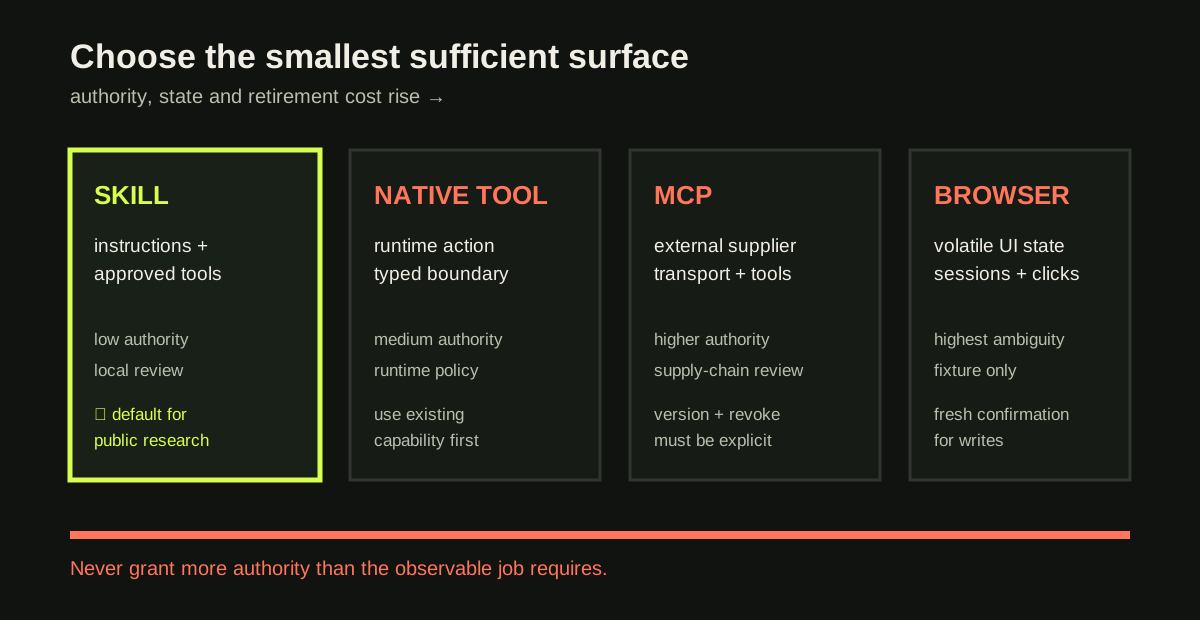
The diagram is an authority gradient, not a universal ranking. A native tool can be more powerful than a poorly contained MCP server. Compare real authority rather than labels.
Four questions that expose overpowered designs
For each candidate surface, answer the same questions:
- What input crosses the boundary? Name the fields, maximum size, allowed characters, and whether a URL or identifier must come from an allowlist.
- What can the surface read? Include files, environment variables, browser storage, network destinations, model context, and third-party responses.
- What can it write or trigger? “No writes” must include messages, issue creation, drafts, downloads, credential mutation, and hidden browser submissions.
- How is it stopped and removed? Name the exact disable switch, configuration entry, credential revocation, process stop, and post-removal denial check.
A candidate that cannot answer these questions is not ready for connection. “It only reads tasks” is an intention. A permission inventory might reveal unrestricted network, all project files, and host commands. Evaluate capability, not marketing language.
Worked example — weekly release research
Suppose the requested outcome is: “Every Friday, summarise up to three changes from the official public release notes and provide canonical URLs.” The candidate designs are:
| Surface | What it needs | Hidden risk | Decision |
|---|---|---|---|
| Skill over approved retrieval | URL allowlist, max three findings, structured output | Retrieval may return unavailable or stale evidence | Select as baseline |
| Native tool | Same allowlist and result contract | More runtime authority than instructions alone | Consider if a matching tool exists |
| MCP server | Server transport, supplier package, config and tool allowlist | Supply-chain and inherited permissions | Reject unless it supplies a needed API |
| Browser with maintainer login | Session, page navigation, selectors | Credential leakage and accidental publish | Reject; no account is needed |
The selected design is not “the most autonomous.” It is the smallest surface that can produce a useful, cited answer. If a later requirement adds a private release feed, update the data classification and permission review; do not silently expand the public skill.
job: weekly public release research
input: topic string, max 160 chars
sources: [https://github.com/openclaw/openclaw/releases]
output: <=3 findings with claim, canonicalUrl, retrievedAt
reads: approved public release pages only
writes: none
credentials: none
human_gate: review before distribution
fixture: local release fixture
kill_switch: disable skill and remove its registration
rejected: browser login, unrestricted MCP server
Expected output: surface=skill; authority=read-only; sideEffects=[]
The record is intentionally boring. That is a strength: another operator can review it without guessing what “research” means.
Hands-on lab — make the gradient concrete
Create four cards for the same job: skill, native tool, MCP server, and browser. For each card record input, output, read authority, write authority, network destination, credentials, human confirmation, fixture target, owner, expiry, and revoke action. Cross out a card if it needs any capability not justified by the outcome. Then write one paragraph defending the survivor and one paragraph rejecting the most tempting alternative.
Expected result: the selected design has one public source class, no credentials, bounded output, and a tested disable action. The rejected browser design should explicitly name personal-profile leakage and irreversible clicks as reasons for rejection. A rejected MCP design should name the missing evidence—supplier version, transport, or minimum tool allowlist—not merely say “MCP is dangerous.”
Common failure cases are useful signals. If your selected design needs a personal browser profile, the public research job is underspecified. If you cannot name a fixture, you have not made the behavior testable. If the output includes uncited model prose, the source boundary is too loose. If the only rollback is “uninstall later,” identify how to prevent a second invocation while removal is in progress.
Local practice
Surface selection evidence
Every step remains visible without JavaScript. When enabled, this browser stores checks on this device only.
0 of 5 checked
Checkpoint
Which design is safest for “summarise three approved public release notes and return their URLs”?
A. Browser automation logged into a maintainer account
B. A read-only skill with a URL allowlist and structured result schema
C. An MCP server that can write issues and read mail
D. A tool with unrestricted shell access
Answer: B. It satisfies the outcome with the least authority, no credential dependency, and an auditable source boundary. The other options introduce state or writes that the job does not require.
Rollback and learner artifact
Do not install or connect anything for this lab. Rollback is therefore a design action: delete the proposed connection steps, retain the decision record, and return to the next-lower-authority candidate. If you already connected a candidate in a disposable environment, disable it, remove its configuration, revoke the fixture credential, and run a denial check before continuing.
Submit a one-page decision record plus the four-card comparison. It should be possible for a reviewer to answer “what does this surface reach, and how do we stop it?” in under two minutes. Record the OpenClaw docs revision above beside the decision; the receipt is tied to 2026.7.1 and revision 2d2ddc43d0dcf71f31283d780f9fe9ff4cc04fe4, so a future update can re-check the claim rather than treating this lesson as timeless. Re-check the pinned references when the implementation surface changes; they bound platform concepts, while the worksheet remains the evidence for this decision.
Source provenanceVerification and sources
Review receipt rr_skills_surface_selection
- Outcome
- approved
- Method
- source-review
- Reviewer
- academy-editorial
- Reviewed
Evidence
- openclaw-docs-skills — cc570a7-docs-tools-skills; snapshot
5a734c2f8488… - openclaw-docs-mcp — cc570a7-docs-tools-mcp; snapshot
37fc1164d79d…
Limitations
- Approval covers the bounded instructional claims, pinned primary sources, and disposable fixture evidence; no personal profile, production account, or external write was used.
Lesson checkpoint
Ready to move on?
Mark this lesson complete when you can apply its outcome without relying on the examples above.