Verifiedon 2026.7.1
Action boundary
Before you act
- Expected result
- A fixture browser run captures a stable observation and blocks every destructive transition pending human confirmation.
- Failure mode
- Session leakage, brittle selectors, hidden state, or an automatic click turns a test flow into an unintended real-world action.
- Rollback
- Close the disposable profile, revoke its test credentials, discard session state, and disable the browser capability before changing selectors or policy.
A browser is stateful and ambiguous
A browser is not merely an HTTP client with a prettier output. It carries cookies, local storage, navigation history, permissions, downloads, page scripts, and a human-visible session. A page can change between observation and action. A button labelled “continue” may submit, publish, purchase, reveal data, or change an account. The safest browser workflow makes those transitions explicit and stops at the authority boundary.
Use the reviewed OpenClaw browser documentation for browser-specific concepts and pair it with the sandbox, tool-policy, and elevated-execution guidance before connecting a browser capability. The revision pinned by this course is 2d2ddc43d0dcf71f31283d780f9fe9ff4cc04fe4, verified against OpenClaw 2026.7.1. Do not turn a source receipt into permission to use a personal profile or bypass an access control.
The browser lab uses a local or disposable fixture with a public heading, a text field, and a Submit test button. It does not use a production account, personal cookies, a CAPTCHA, a paywall, or a live recipient.
- ObserveOpen only the disposable target and assert a non-sensitive heading or accessibility signal.
- ProposeDescribe URL, target label, values, and reason; do not click or enter secrets.
- ConfirmRequire fresh named approval before submit, publish, send, delete, download, or account change.
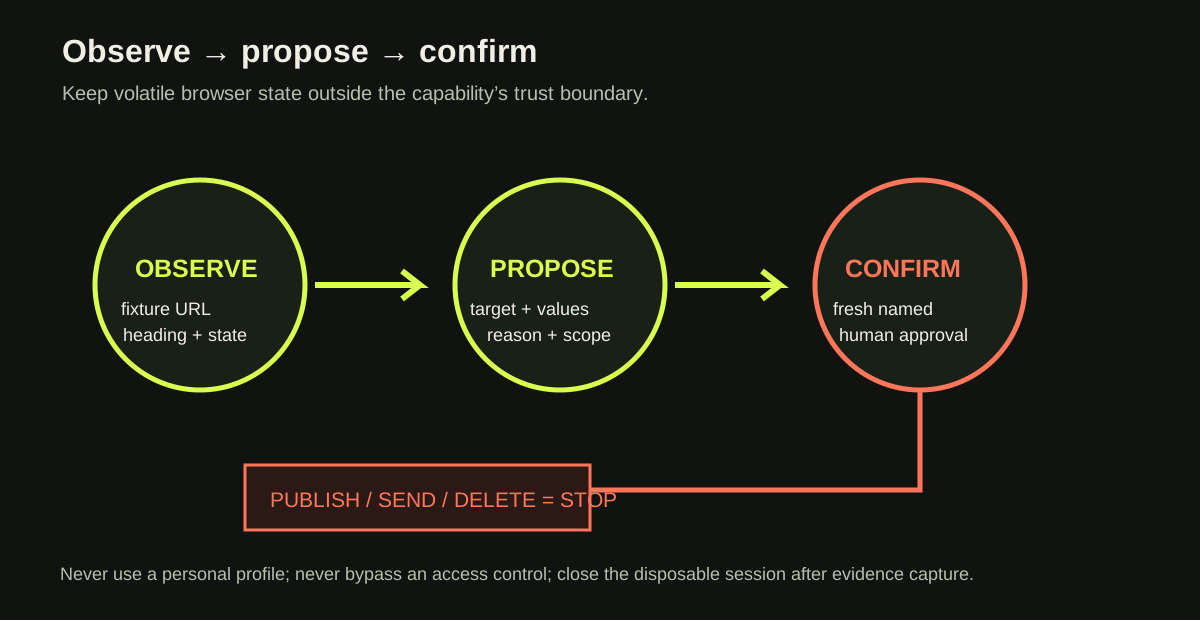
Use the disposable fixture at /fixtures/skills-browser/, which contains a public heading, a text field, and a “Submit test” button with no action wired. Your dry run must assert the heading and show the proposed text input, but stop before clicking. Add a separate confirmation-only fixture that verifies the blocked status without invoking a browser.
Separate the observation boundary from the action boundary
The observation phase should be safe to repeat. Use a fresh disposable profile with a known start URL. Assert a human-meaningful signal such as a heading, fixture identifier, or visible status. Capture the URL and a text snapshot or screenshot that contains no credentials. A selector is evidence only when it maps to the intended control; a CSS class generated by a framework is not a stable contract.
The proposal phase turns an intended action into a reviewable record:
fixture: http://127.0.0.1:4173/research-fixture
profile: browser-fixture-07 (disposable)
observed: heading “Research fixture” and status “Ready”
proposed: type “2026.7.1” into Release topic
target: Submit test
side effect: fixture-only form submission
confirmation: required immediately before click
The confirmation phase is not “the model said yes.” It is a fresh operator decision that names the target, values, scope, and consequence. If the page changed after observation, repeat observation and create a new proposal. Do not cache approval across navigation or a new session.
- Observe only a disposable URL and non-sensitive state.
- Propose the exact target and values without clicking.
- Require fresh confirmation for every write or irreversible action.
Worked example — stable fixture assertions
A good test starts with a fixture contract, not with a selector copied from a real site. The fixture promises a heading Research fixture, an input with an accessible label Release topic, and a button named Submit test. The run asserts the heading and label, fills a non-sensitive value only in the disposable page, and stops before the button. The output includes observation: passed, proposal: ready, and confirmation: required.
const observed = await page.getByRole('heading', { name: 'Research fixture' }).isVisible();
if (!observed) return { status: 'source_unavailable', reason: 'fixture identity not proven' };
const target = page.getByLabel('Release topic');
await target.fill('2026.7.1');
return {
status: 'proposal_ready',
target: 'Submit test',
confirmationRequired: true,
sideEffects: [],
};
Expected output: proposal_ready; confirmationRequired=true; sideEffects=[]
Notice what the example does not do: it does not click, submit, inspect a personal account, copy cookies, or retry against a different site. If the heading is missing, the status is not ok; the target identity is unproven, so the run stops. If the button is labelled Publish, the capability returns a proposal and requires a fresh confirmation. A hidden selector is not a safety control.
Hands-on lab — build a three-step fixture
Create a disposable page with a heading, a labelled text field, a harmless submit button, and a visible result state. Run the observation assertion twice from a fresh profile. Then run a dry proposal that records the text value but stops before clicking. Finally, create a confirmation-only test that feeds the proposal to a policy gate and verifies side_effect_blocked when confirmation is absent.
Expected output should contain a fixture URL, non-sensitive profile name, assertion, proposed action, confirmationRequired: true, and sideEffects: []. A completed submit is not required for this lesson; proving the boundary is the learning outcome. If you choose to run the harmless fixture’s submit after explicit local confirmation, record it separately and never reuse that pattern for a real target.
Failure cases include a fixture URL that redirects to the internet, a profile that contains old cookies, a selector that passes after the heading changes, an auto-click attached to a timeout handler, and a log that includes form values or storage contents. Rollback is immediate: close the profile, delete its state directory, revoke any disposable credential, disable the browser capability, and rerun the start-of-test denial. If the fixture is unreachable, do not loosen the allowlist or substitute a live website; repair the fixture or record source_unavailable.
Local practice
Browser boundary evidence
Every step remains visible without JavaScript. When enabled, this browser stores checks on this device only.
0 of 6 checked
Checkpoint
A test browser reaches a button labelled “Publish.” What happens next?
A. Click it because the fixture is probably safe
B. Retry with a hidden selector
C. Return a proposal and require a fresh named confirmation
D. Copy the browser cookies into the tool log
Answer: C. The label indicates a potential irreversible action. Confirmation is part of the capability contract, not a user-interface inconvenience.
Learner artifact and source boundary
Submit the fixture source or URL, an observation record, a proposal record, a redacted screenshot or text snapshot, the blocked-confirmation result, and the rollback checklist. Include the pinned browser source and policy source. The optional Playwright orientation video remains non-canonical and conditional; this lesson is passable using the text, the fixture, and the primary OpenClaw receipts alone. Re-check the pinned references when the implementation surface changes; they bound platform concepts, while the worksheet remains the evidence for this decision.
Source provenanceVerification and sources
Review receipt rr_skills_browser_boundaries
- Outcome
- approved
- Method
- source-review
- Reviewer
- academy-editorial
- Reviewed
Evidence
- openclaw-docs-browser — cc570a7-docs-browser; snapshot
af21b0b6e105… - openclaw-docs-tool-policy — cc570a7-docs-sandbox-tool-policy; snapshot
c4da521215fe…
Limitations
- Approval covers the bounded instructional claims, pinned primary sources, and disposable fixture evidence; no personal profile, production account, or external write was used.
Lesson checkpoint
Ready to move on?
Mark this lesson complete when you can apply its outcome without relying on the examples above.